Buying guide · checked 12 October 2026
Buying a War Thunder account: what to check
Check which nations are at top tier in air and ground, which premium and event vehicles are in the hangar, and that the registration email comes with the Gaijin account. Median asking prices run from $68 for a rank V to VII account to $770 for a collector account. After delivery, secure the mailbox, change the password and connect your own Gaijin Pass.
War Thunder progression is slow, so an account’s value lives in what is already researched and bought. Two accounts at the same price can be worlds apart in what you can actually take into battle. This guide covers what sets the price, how to check a listing, how to buy and secure the account, and what Gaijin’s terms say.
Ready to look? Buy War Thunder accounts that we have checked by hand, or start on the War Thunder hub.
Value
What makes a War Thunder account valuable
Focus on what took the longest to grind or can no longer be bought. The table shows what each common listing term means and how to check it.
| Factor | In a listing | What it means and what to check |
|---|---|---|
| Nations at top tier | “USSR + France top tier” | The biggest price driver. A title should name each nation and say whether it means aircraft, ground vehicles or both. Ask for a screenshot of every researched tree. |
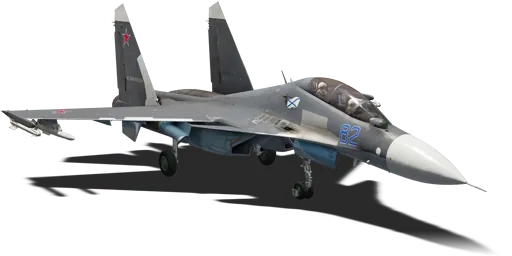
| Rank and battle rating | “Rank 8”, “14.7” | Ranks run from I to IX. Rank IX jets such as the Su-30SM2, Rafale C F3 and F-2000A (AESA) sit at battle rating 14.7 in Realistic Battles. |
| Premium vehicles | “premium”, pack names | Bought in the Gaijin Store or with Golden Eagles. They cannot be researched, earn more and are what separates two accounts at the same rank. |
| Retired packs | “removed”, “rare premium” | Gaijin retires some packs after store sales: six left sale on 14 May 2026, among them the MiG-21 Bison and F-20A Tigershark. Check the vehicle is really in the hangar. |
| Event and Battle Pass vehicles | event names | Earned in limited events or a Battle Pass season and not researchable later. Ask for the hangar, not a list. |
| Silver Lions and Golden Eagles | “10kk SL” | Balances are claims until you see the in-game wallet in a current screenshot. |
| Premium account time | “premium 300 days” | Ask for the premium account timer. It boosts research and Silver Lions earned while it lasts. |
| Crews | “aced crews” | Trained crews save a lot of grind on each vehicle. Ask for the crew screen on the nations you will play. |
| Platform | “PC”, “PS5”, “Xbox” | Transfers of PlayStation and Xbox accounts to PC are suspended, and War Thunder Mobile progress is separate. Buy on the platform you play. |
| Login and email | “full access”, “with mail” | Who holds the registration email holds the account: Gaijin does not change emails for compromised accounts. Steam-created accounts need an email bound to log in from the launcher. |
METAMMO War Thunder account prices and listing analysis (daily) · War Thunder Wiki (Gaijin) — vehicle pages · Gaijin Store — War Thunder packs · May sale: six packs retired after 14 May 2026 (Gaijin news) · Transfer PlayStation account to PC: suspended (Gaijin support) · Account compromised or lost: how to recover (Gaijin support)
Ranks and battle ratings are explained on ranks and BR, and each nation’s trees on nations.
Platform and timing
Steam, console and when to buy
An account created through Steam needs an email bound to it before it can log in from the regular launcher or buy in the Gaijin Store. The email must never have been used in any Gaijin game. If a Steam account is part of the listing, it is part of what you need to receive.
Console accounts are a separate product. Gaijin has suspended transfers of PlayStation and Xbox accounts to PC until further notice, and War Thunder Mobile has its own servers and progress.
The current major update is 2.59 “Sky Odyssey”, released on 16 September 2026, with patch 2.59.0.65 on 13 October 2026. Gaijin also retires premium packs after store sales and moved some ground vehicles between ranks in a reshuffle announced on 25 August 2026, so check the hangar on the day you buy, not last season’s screenshots.
How to bind an email to an account created via Steam (Gaijin support) · Transfer PlayStation account to PC: suspended (Gaijin support) · Progress cannot move between PC/console and War Thunder Mobile (Gaijin support) · War Thunder "Sky Odyssey" — Changelog · Update 2.59.0.43 · May sale: six packs retired after 14 May 2026 (Gaijin news) · Reshuffles to the ground vehicle research trees (Gaijin news)
Checklist
Six things to check
- 1
Which nations are at top tier — in air, ground or both
This is what an account is priced on first. “Top tier” in a title should name the nations and whether it means aircraft, ground vehicles or both; ask for screenshots of each researched tree.
METAMMO War Thunder account prices and listing analysis (daily)
- 2
The vehicles the title names
Premium, event and Battle Pass vehicles cannot be researched, so they are what sets one account apart from another at the same level. Ask for a hangar screenshot showing them, not just a list.
- 3
Silver Lions, Golden Eagles and premium time
Balances and premium account days in a title are claims to verify: ask for a screenshot of the in-game balance and the premium account timer.
- 4
The Gaijin account email
You should end up controlling the Gaijin account and the email bound to it. Without the email, the previous owner can reset the password and take the account back.
- 5
Gaijin Pass
Gaijin Pass is Gaijin’s own app that asks for an access code when the account signs in from a new device. After purchase, the previous owner’s Gaijin Pass must be removed and yours connected.
- 6
A low level with one top vehicle is a different product
Many cheap listings are low-level accounts with a single bought top-tier vehicle. They play very differently from an account researched to the top — read the level and the trees, not just the vehicle name.
METAMMO War Thunder account prices and listing analysis (daily)
What the market pays for
Nations at top tier come first
Across 4,979 public listings in the last 90 days, the median asking price rose from $68 for mid-tier accounts to $249 with one nation at top tier, $399 with two to four and $770 for collector accounts.Data
Segments, nations and per-vehicle figures on the price index; what each vehicle is and how it was obtained on the vehicles page.
Step by step
How to buy a War Thunder account safely
- 1
Decide what you will play
Air, ground, helicopters or naval, and which nations. An account stacked with top jets is wasted on a tank-only player, and the reverse. Pick the nations first, then look for accounts that have them at top tier.
War Thunder Wiki — ground vehicle trees · War Thunder Wiki — aviation trees
- 2
Check the platform
Buy a PC account to play on PC. Gaijin has suspended moving PlayStation and Xbox accounts to PC, and War Thunder Mobile does not share progress with the PC and console game.
Transfer PlayStation account to PC: suspended (Gaijin support) · Progress cannot move between PC/console and War Thunder Mobile (Gaijin support)
- 3
Ask for live proof
Current screenshots or a short video of each research tree, the hangar with premium and event vehicles, the Silver Lions and Golden Eagles balance, the premium timer and the account level. A seller who refuses to show the account live is a reason to stop.
- 4
Check the vehicle names and ranks
Look each named vehicle up on the official wiki or our vehicles page. Gaijin announced on 25 August 2026 that some ground vehicles move between ranks, so re-check any “Rank 8” claim.
War Thunder Wiki (Gaijin) — vehicle pages · Reshuffles to the ground vehicle research trees (Gaijin news)
- 5
Confirm the email comes with it
You need the Gaijin login and the registration mailbox itself. Gaijin does not offer an email change for compromised accounts, so whoever keeps the mailbox can take the account back. For a Steam-created account, the Steam account is part of the sale.
Account compromised or lost: how to recover (Gaijin support) · How to bind an email to an account created via Steam (Gaijin support)
- 6
Agree the Gaijin Pass and phone handover
Gaijin Pass and two-step codes are tied to the seller’s phone until switched. Agree how the old app and phone number will be removed so you can connect your own right after delivery.
Gaijin Pass (Gaijin support) · Two-step authentication troubleshooting and disabling (Gaijin support)
- 7
Pay only through a checkout with a written warranty
Do not pay outside the checkout and do not accept pressure to pay now. The warranty should state what happens if the previous owner recovers the account.
- 8
Secure everything in the first hour
Change the mailbox password, then the Gaijin password, bind your phone, connect your own Gaijin Pass and save the reserve codes. Then check the login history and any linked email addresses.
Gaijin Pass (Gaijin support) · Additional email addresses and login management (Gaijin support)
Want help picking? Browse War Thunder accounts for sale and ask support which one fits the nations and modes you play.
Red flags
Red flags and common scams
- No registration email, or “email later”.
- The seller refuses to show the trees and hangar live.
- “Top 10 nations” with no list of vehicles or screenshots.
- A PlayStation or Xbox account offered to a PC player.
- The seller wants to keep the phone number or Gaijin Pass “for a few days”.
- A low-level account with one bought top vehicle described as “top tier”.
- Pressure to pay quickly, or a request to pay outside the checkout.
- A price that looks too good for the trees shown.
Recovery through the email
Gaijin support says it does not provide an email change service for compromised accounts and points owners to their mail provider. In practice the registration mailbox is the account: a seller who keeps it can reset the password at any time.
Account compromised or lost: how to recover (Gaijin support)
A hidden second email
A Gaijin account can have additional email addresses. A newly linked one can be used as a login a month after binding, and the main address gets a notice so it can be blocked. Check the email section after delivery.
Additional email addresses and login management (Gaijin support)
Locked out by email two-step
On accounts with a confirmed email and past purchases, Gaijin turns on two-step authentication by email when someone signs in from a new device. Without the mailbox, your first login can fail.
Two-step authentication via email enabled automatically (Gaijin support)
The seller’s phone
If the phone number on the account is not yours, the seller can use SMS codes to disable two-step and connect a new Gaijin Pass. Your own number must be bound before you rely on it.
Two-step authentication troubleshooting and disabling (Gaijin support)
After you buy
After you buy: securing the account
Do this in the first hour, in this order. Support stays in the delivery chat while you do it.
- 1
Secure the mailbox first
Change the email account’s own password and recovery options. Gaijin sends logins, codes and security notices there, so it is the real key to the account.
Account compromised or lost: how to recover (Gaijin support) · Two-step authentication via email enabled automatically (Gaijin support)
- 2
Change the Gaijin password
Use the profile page on the War Thunder or Gaijin Store site. For a Steam-created account, bind an email through the in-game “E-mail binding” option first; Gaijin then emails a password you can change.
How to bind an email to an account created via Steam (Gaijin support)
- 3
Bind your phone and connect Gaijin Pass
Gaijin Pass needs a confirmed email and a linked phone. Connect it in Settings, Account protection; it then asks for a confirmation when the account signs in from a new device.
- 4
Keep the reserve codes
Reserve codes let you set up a new Gaijin Pass if your phone is lost. Without them or your phone number, support asks for invoices for the last three purchases and the PC’s system information.
Two-step authentication troubleshooting and disabling (Gaijin support)
- 5
Review linked emails and login history
In the email section, check the login history and block any extra address you do not own. A linked email can be removed 60 days after it was last used to log in.
Additional email addresses and login management (Gaijin support)
- 6
Keep it to yourself
Gaijin’s terms say each account is personal and may not be shared, and that the user is responsible for keeping the login confidential.
Gaijin Terms of Service, clause 3.6 · Account compromised or lost: how to recover (Gaijin support)
Why buy from METAMMO
Every METAMMO account is checked by hand before listing: we sign in and compare the trees, hangar and balances with the title. Not sure which one fits? Support will help you choose by nation, mode and budget.
Every account carries a lifetime warranty against recovery: if a previous owner ever takes the account back, the original buyer gets a replacement or a full refund, your choice.
Full warranty terms →62 available
Top-tier War Thunder accounts
USSR Top Tier Air | Su-30SM2, MiG-23ML | Level 49 | 2.35M SL | 170 GE
USSR Top Tier Air | Su-30SM2 | MiG-23ML Aced Crew | 2.35M SL | 170 GE

Germany Full Top Tier | Leopard 2A7V, Leopard 2A5, IRIS-T SLM, M1A1 AIM, T-44-100 | Multi-Nation Progress
France Top Tier incl Naval | AMX-30 B2/BRENUS, Leopard 2A4NL, Tiger HAD Block 2 | Aced Crews, 10 Crew Slots
Keep reading
More on War Thunder accounts
- War Thunder accounts for sale: hand-checked stock with nations and vehicles in every title.
- War Thunder account price index: median asking prices by segment, nation and vehicle.
- Vehicles and updates: what each vehicle is and what the latest patches changed.
- Retired War Thunder packs in 2026 and are premium vehicles worth it.
Still choosing where to buy? Where to buy a War Thunder account safely compares buying from a store with escrow marketplaces: who you pay, how long each covers recovery and what happens if the account is taken back.
Answers
Buying FAQ
Is it safe to buy a War Thunder account?
The main risk is the previous owner recovering it through the email or Gaijin Pass. Full access with the email and your own Gaijin Pass removes most of it, and a lifetime warranty against recovery covers the rest.
What should a War Thunder account cost?
In public listings over the last 90 days, the median asking price was $68 for rank V to VII, $249 with one nation at top tier, $399 with two to four and $770 for collector accounts.
What is Gaijin Pass?
Gaijin’s official app that adds a second step to signing in: with it connected, an access code is needed to log in from a new device. On a bought account it has to be switched to the buyer.
Can I change the email on a Gaijin account?
You can add another email, which works as a login a month after binding, but Gaijin does not change emails for compromised accounts. That is why the registration mailbox itself has to come with the account.
Can I move a console War Thunder account to PC?
Not at the moment. Gaijin has suspended transfers of PlayStation and Xbox accounts to PC until further notice, and War Thunder Mobile progress is separate from PC and console. Buy an account on the platform you play.
Are premium vehicles worth paying more for?
Usually, if you will play them. Premium and event vehicles cannot be researched, they earn more, and retired packs can no longer be bought from Gaijin. A premium in a nation you never play adds little for you.
Does the Sky Odyssey update change what an account is worth?
It can. Sky Odyssey (16 September 2026) added Greek aircraft to the Israeli tree and new top jets such as the MiG-35 and F-14D. Accounts with those trees researched gain appeal; check each listing’s hangar.
What does the METAMMO warranty cover?
Recall or recovery by a previous owner, for the life of the account: you get a replacement or a full refund, your choice. Losses from sharing your login are not covered.
Facts checked: 12 October 2026 · Sources: Gaijin Terms of Service (clauses 3.5 to 3.10), Code of Conduct changes, 18 August 2026, Gaijin Pass, Gaijin support: account recovery, Gaijin support: additional emails, Gaijin support: two-step authentication, Gaijin support: console transfer, Gaijin news: May 2026 retired packs
Available
Hand-checked War Thunder accounts, ready to deliver
Hand-checked War Thunder accounts with a lifetime warranty against recovery by a previous owner.
 GLOBAL, LVL23, 11 PREMIUMS, 900K SILVER LIONS, 200+GOLDEN EAGLES, 350K CONVERTIBLE RESEARCH POINTS$279View account →Available
 Italy | Ariete, PSO, Otomatic | High End Italian Account$599View account →Available
 USA + USSR + 5 Nations Top Tier Ground | USSR + UK Air | Maus, 38 cm Stu | XM1, MiG-23ML, T-80U-E1$1299View account →What sets the price
- Nations researched to top rank
- Premium, event and squadron vehicles
- Top battle rating in air and ground
- Silver Lions, Golden Eagles and account level